
If there’s one thing social media teams need more of, it’s time. More time to ideate, to execute, and to engage with customers.
When that’s not possible, the next best thing is to use social media collaboration tools to get everything done.
Below, we rounded up the top social media collaboration tools and the features to give your social team a boost.
Key takeaways
- The best social media collaboration tools combine planning, approvals, communication, and publishing so teams aren’t stitching together context across multiple platforms.
- Strong collaboration platforms don’t just help you publish. They also offer built-in analytics that connect social efforts to business results.
- Hootsuite goes beyond collaboration. It combines workflow management, automation, analytics, inbox tools, and integrations (like Canva and Zendesk) into one enterprise-ready platform.
A social media collaboration tool is software that helps teams plan, create, review, approve, and publish content, all from one shared workspace.
It doesn’t just benefit marketing. The right tool brings marketing, creative, legal, and other stakeholders into the same workflow, with clear roles, approvals, and permissions (no more “who approved this?” moments).
Bonus: Download our bundle of free customizable social media workflow templates and set up a clear approval process for your team in minutes.
Here are key features to look for in a social collaboration platform:
Team communication
A good social media collaboration tool should streamline team communication. Collaboration features like task assignments, approval tracking, and real-time comments make this possible.
One of the biggest mistakes teams make? Adding more tools to the toolbox. Suddenly, strategy lives in one platform, drafts in another, feedback in email, and quick questions in Slack.
This can easily create bottlenecks. You’re switching tabs, digging through threads, and trying to piece together context from scattered conversations.
To avoid the chaos, look for collaboration tools that centralize communication.
For example, in Hootsuite, you can assign tasks — like responding to comments or handling customer service inquiries — directly within the dashboard. Plus, social media drafts can be reviewed and approved in the same place posts are scheduled.
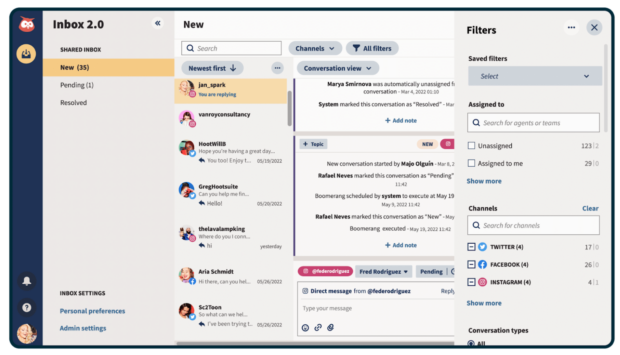
Real-time commenting also allows teams to collaborate on drafts and engagement without leaving the workflow.
Workflow automation
Automation helps teams reduce repetitive tasks, giving them more time to collaborate on creative assignments or focus on strategy.
Look for features like saved replies, automatic approval routing, and task triggers. These are small but impactful productivity boosters, especially for larger teams.
For example, Hootsuite Inbox 2.0 lets you create saved replies for routine comments, questions, and DMs. Your team can respond faster, stay consistent, and keep customer conversations moving without typing the message again and again.

Reduce response time (and your workload)
Manage all your messages stress-free with easy routing, saved replies, and friendly chatbots. Try Hootsuite’s Inbox today.
Content planning
A strong social media collaboration tool should include a content calendar or planner so everyone can map out what’s scheduled, what’s in review, and what still needs to be created.
Because if your team can’t see what’s going out and when, you don’t really have collaboration.
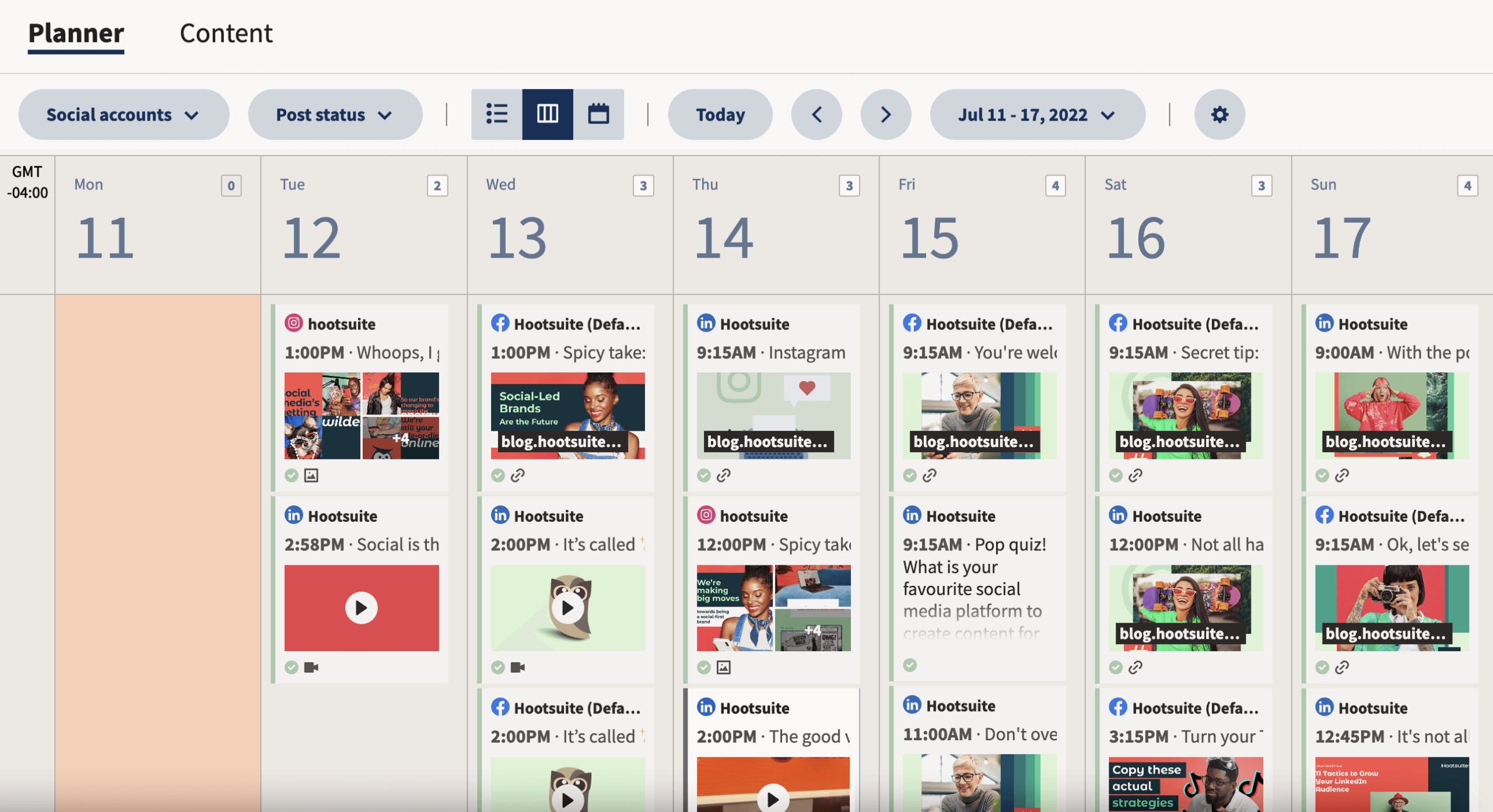
When your content calendar lives inside your social media management tool, team members can quickly scan upcoming posts across every platform, spot gaps before they become problems, and keep publishing consistently without endless meetings or spreadsheet updates.
Analytics and reporting
Strong collaboration tools don’t just help you create content. They help you prove it’s working.
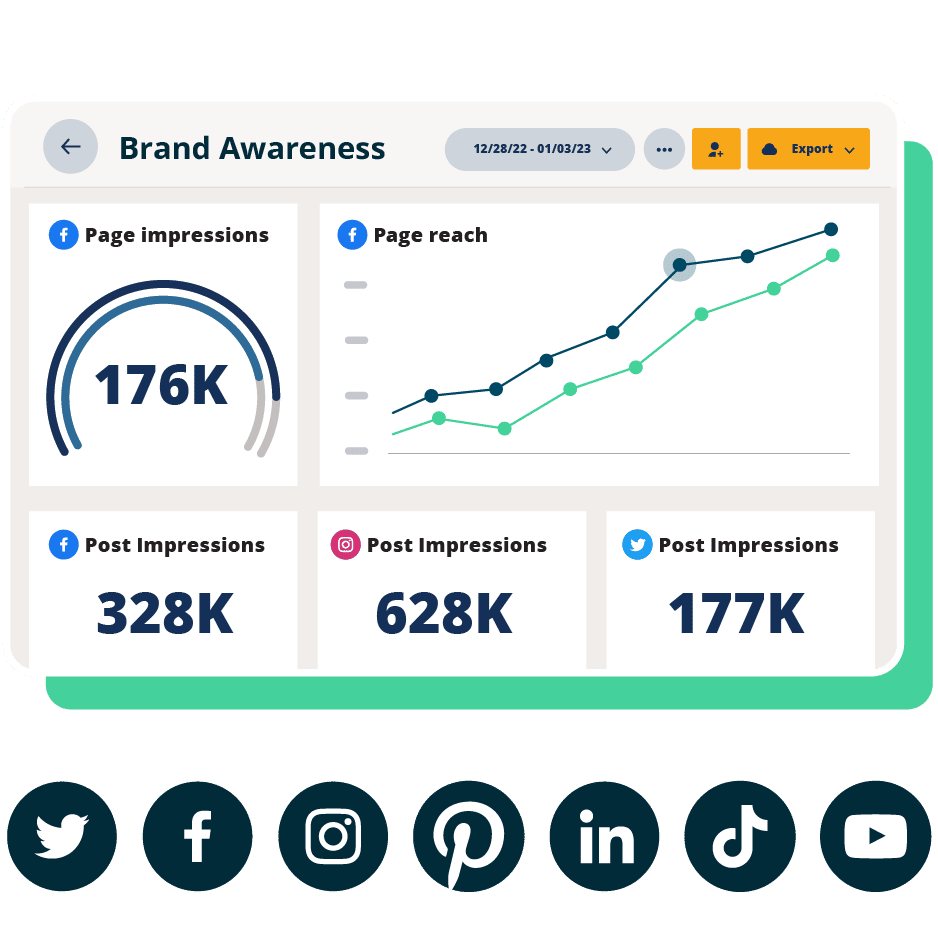
Built-in analytics and reporting features give teams a shared view of performance, so creators, social media managers, and executives are all working from the same data.
Look for tools that make it easy to generate clear, shareable reports. That way, insights don’t get stuck in someone’s spreadsheet — and you can confidently show the impact and ROI of your social strategy.
#1 Analytics Tool for Growth
Beautiful reports. Clear data. Actionable insights to help you grow faster.
Let’s take a look at some of the top social collaboration tools at a glance:
| Tool | Best for | Key collaboration features | Ideal team size |
| Hootsuite | All-in-one social media collaboration | Built-in approvals, shared content calendar, and social media inbox | Mid-size to enterprise |
| Trello | Campaign tracking | Task boards with assignments and comments | Small to mid teams |
| Monday.com | Project management | Custom workflows and shared dashboards | Mid-size teams |
| Slack | Real-time communication | Organized channels, app integrations (like Hootsuite), and file sharing | All team sizes |
| Canva | Content creation | Shared templates and commenting. | Small to mid teams |
| Zapier | Workflow automation | Automated workflows across apps | Small to enterprise |
| Zendesk | Social + customer service alignment | Shared ticketing system with conversation history | Mid-size to enterprise |
If your team wants everything in one place — planning, approvals, publishing, reporting, and inbox management — these tools combine it all into a single dashboard.
1. Hootsuite
Hootsuite is an all-in-one social media platform that offers tons of features to help social marketing teams collaborate and manage their tasks better, all from one easy-to-use dashboard.
To start, teams can create an organization within the platform to easily share access to multiple social accounts and better manage the workload among members.
They can choose who has access to what, assign tasks to different members, manage multiple social feeds from one place, and even relay messages to specific teams within the organization.
Plus, the shared calendar gives everyone instant visibility into organic and paid posts — what’s drafted, scheduled, and already live. And with the bulk scheduler, teams can queue up to 350 social media posts at once, freeing up time to focus on other work.

Hootsuite can integrate with your CRM, as well as tools like Canva, Dropbox, and Zendesk. This means collaboration extends beyond social media scheduling and publishing. From creative production to customer support, everything connects.
That means Hootsuite’s powerful all-in-one solution is ideal for teams managing multiple social and customer service channels, or agencies that oversee several brand accounts at once.
Best for: Social teams looking for a solution to cross-collaborate and seamlessly manage multiple brand accounts in one place.
Pricing: Starts at $199/month per user with a 30-day free trial.
Not every team needs a social-first tool. These tools provide strong project and task management:
2. Trello
While not specifically geared towards social media, Trello is one of the best project and task management tools for social teams.
Trello offers a visual workspace for tracking tasks, assignments, and social posts. Teams can organize their projects or campaigns in boards, and separate individual tasks into cards that can be dragged to different boards based on their status.

Trello integrates with Hootsuite, so you can send tasks or posts to your Trello board directly from your Hootsuite dashboard.
Best for: Trello is best for keeping visual tabs on the status of certain tasks or campaigns.
Pricing: Trello offers a free plan for individuals. Paid plans start at $5 per user per month.
3. Monday.com
Monday.com is a project management tool that can help social teams manage tasks and communicate with teams outside of social.
The platform is user-friendly and visual, making it easy for anyone on your team to get started. Use Monday.com to plan tasks, make creative requests for your design team, and track the status of different campaigns.

Source: monday.com
With the Monday.com app, you can import all your scheduled posts to a board to get an overview of your planned content. This is convenient if other teams in your organization use Monday.com and want visibility into what’s coming up on social.
Best for: Project management across teams.
Pricing: Monday offers a free plan for individuals. Paid plans for teams start at $24 per month.
4. ClickUp
ClickUp is an all-in-one productivity platform. And while not specifically designed for social media, it’s great for teams that like structure (and lots of visibility).
Inside ClickUp, you can build detailed task databases, organize projects by content type or campaign, assign work to specific team members, and filter everything by custom tags.
Its biggest strength is transparency. Every task, deadline, and dependency is visible, which makes it much easier to spot bottlenecks or collaboration gaps.

Source: ClickUp
Best for: Cross-collaboration across your organization.
Pricing: ClickUp offers a free plan for individuals. Paid plans for teams start at $7 per user per month.
The more teams involved, the more chances for delays. These tools make it easier to share context, get approvals, and keep everyone working from the same source of truth.
5. Google Workspace
While Google Workspace isn’t a social media collaboration tool in the traditional sense, it’s the behind-the-scenes engine for many teams.
Whether you’re jotting down internal notes or content ideas in a Google Doc, tracking metrics in a Google Sheet, or storing visual assets in Google Drive, the workspace makes it easy to ensure everyone on your team stays organized.

Source: Google Workspace
Best for: Cross-team collaboration, brainstorming, and organization across your company.
Pricing: Plans start at $6 per user per month.
6. Slack
Slack is a messaging platform that helps teams stay connected in real-time. For social teams, it’s great for quick updates, sharing inspiration in a dedicated channel, or getting instant feedback. It’s real-time collaboration made easy.
With the Slack app for Hootsuite, you can share social posts directly to your team’s Slack channel for instant feedback (or to encourage engagement).

Best for: Sharing updates, announcing new posts, or communicating ideas with your team in real-time.
Pricing: Paid plans for teams start at $7.25 per month.
7. Miro
Miro is an interactive way to collaborate with your social team. The platform offers a visual space to share ideas, integrate data, and add feedback all in one place.
This collaborative tool can be especially helpful for conducting a social media content audit, working on a social media strategy, or creating a visual content calendar.

Source: Miro
Best for: Interactive brainstorming or creating a visual presentation of ideas to your team or organization.
Pricing: Miro offers a free plan with limited features to get started. Paid plans for teams start at $8 per member per month.
8. Dropbox
Dropbox is a secure file storage and sharing platform that makes it easy for social teams to keep all their creative assets in one place.
It’s not just for images. Teams can store brand guidelines, campaign decks, product demo videos, and internal documents. It’s essentially a content management powerhouse.
Dropbox is especially helpful when multiple team members need access to the same files without digging through email or Slack threads. And if your marketing team regularly collaborates across departments, having a secure asset hub is key.

Source: Dropbox
Best for: File sharing and storage of shared content across distributed teams.
Pricing: Team plans start at $20 per user per month.
9. Canva
Canva is a content creation tool that offers thousands of free templates, making it easy to create professional, publish-ready graphics.
Plus, if you need a second opinion or want to hand off your design to someone else on the team, you can also share, collaborate, and comment on designs directly in the platform.

If you have a Hootsuite account, connect it to Canva to upload creative assets directly in Composer, so your team can quickly access them.
Best for: For small teams that don’t have an in-house graphic design team, Canva is essential to the content creation process.
Pricing: Canva offers a free plan as well as paid plans that start at $15 per month.
Social media is often the first place customers ask for help. These tools bridge marketing and service workflows:
10. Zendesk
If your social team receives a lot of customer service inquiries, then customer service software like Zendesk is essential.
When you use the Zendesk app for Hootsuite, you can add information from DMs and comments to your service tickets. That way, everyone on your team is up to speed on the conversation.
You can also see an overview of tickets in a dedicated stream within your dashboard to increase visibility across the organization.

Source: Zendesk
Best for: Zendesk makes it easy to collaborate with the customer service team.
Pricing: Zendesk plans start at $19 per month. The Zendesk Pro app is $6.99 per month.
TL;DR: Collaboration is essential for social media marketing teams. By integrating some of these social collaboration tools into your team’s workflow, they can save time, communicate better, and produce more aligned social content.
Want more tips on how to optimize your team’s social media efforts? Check out this guide on social media integration.
11. Zapier
Zapier is a workflow automation tool that can streamline recurring tasks, freeing up time for your team to focus on creative work.
With Zapier, you can connect your workflow to thousands of apps — including Slack, MailChimp, and Trello — to automate tasks that are triggered by certain actions. For instance, you can set up an automation that automatically cross-shares your latest blog post on LinkedIn and X (Twitter).
Best for: Large teams with a lot of repetitive tasks on their plate can set up automations to save themselves time and resources.
Pricing: Zapier offers a free plan for individuals. Paid plans start at $19.99 per month.
FAQ: Social media collaboration tools
What are social media collaboration tools and why do teams need them?
Social media collaboration tools are platforms that help teams plan, create, approve, and publish content in one shared workspace. Instead of juggling spreadsheets, Slack threads, and endless email chains, everything lives in one place. Teams use them to reduce confusion, prevent mistakes, and keep content consistent and on-brand.
How do social media collaboration tools improve workflow and governance?
Social media collaboration tools improve workflow and governance by centralizing communication, approvals, and permissions. That means fewer scattered messages and more structured processes. Built-in roles and access controls also make it clear who can draft, edit, approve, or publish. This keeps teams efficient while protecting the brand.
What features should you look for in social media collaboration software?
The features you should look for in social media collaboration software include task assignments, approval workflows, real-time commenting, automation, and content planning features (like a content calendar). Strong reporting tools are also key, so teams can measure performance and prove impact, not just publish posts.
What are the best social media collaboration tools for enterprise teams?
The best social media collaboration tool for enterprise teams is Hootsuite because it combines planning, approvals, publishing, and performance tracking in one dashboard. It also integrates with tools like Canva and Dropbox, so everything stays connected across teams.
How do social media collaboration tools compare to project management tools?
Social media collaboration tools are built specifically for planning, approving, and publishing social media content. Project management tools, on the other hand, track tasks and deadlines across many types of projects, not just social workflows.
Save time managing your social media presence with Hootsuite. Publish and schedule posts, find relevant conversations, engage your audience, measure results, and more — all from one easy-to-use dashboard. Try it free today.