You’re already posting on social media. Social media optimization (SMO) is about making those posts work harder.
From better timing to smarter captions, these 13 simple tweaks can help you reach more people, boost engagement, and turn attention into real impact.
Key takeaways
- Social media optimization makes your content work harder. Small improvements to timing, captions, visuals, and profiles can boost performance.
- Optimization should always be driven by data. Use analytics, social listening, and performance insights to understand what your audience responds to.
- Discoverability is critical for growth. Using keywords and hashtags helps your content surface in social search, feeds, and recommendations.
- Use Hootsuite to optimize at scale. Platforms like Hootsuite help teams schedule posts, identify the best times to publish, generate hashtags, and track performance across multiple networks, all from one dashboard.
Social media optimization is the process of improving your social media content, profiles, and strategies to achieve better results: faster follower growth, higher levels of engagement, more clicks or conversions, and so on.
Common tactics of social media optimization include:
- Basic improvements to individual posts, such as adding a call-to-action in a caption or picking a scroll-stopping visual
- Larger strategic improvements, like redefining your brand’s tone of voice on social media
- Optimizing posting times and frequency based on audience behavior
In any case, social media optimization should be based on performance analysis, audience and competitor research, and insights gathered through social listening.
Social media optimization helps your content reach the right people and actually perform once it gets in front of them. When your posts are easier to discover and more relevant to your audience, everything works better, from reach to engagement to conversions.
Here are some of the biggest benefits:
- Grow your followers faster: Optimized posts are easier to discover, which means more people find (and follow) your brand.
- Understand your audience better: Analytics and social listening reveal what your audience actually cares about, not just what you think they care about.
- Increase brand awareness: When your content performs better, more people see it. That naturally boosts brand awareness.
- Improve reach on social media: Optimization helps your posts surface in feeds, recommendations, and social search results.
- Lead generation: The right content attracts the right audience, which means better leads.
- Sell more products or services: Clear messaging and stronger engagement can turn attention into sales.
- Increase engagement rates: Optimized posts are more likely to spark likes, comments, shares, and real conversations.
TL;DR: When your posts are optimized for discovery, relevance, and performance, it becomes much easier to grow your audience and turn attention into real business impact.
Social media optimization can be divided into five types:
- Engagement optimization
- Growth optimization
- Conversion optimization
- Accessibility optimization
- Overall performance optimization
Let’s break down how to optimize for each type.
Engagement optimization
1. Post at the right times
Posting at the right time increases the likelihood that your audience will see and engage with your content.
There are certain times of the day that your audience is more likely to be online, but figuring out those special windows isn’t easy. Especially when audience habits vary from industry to industry.
Luckily, we’ve done the research to determine the universal best times to post on social media. Here’s the breakdown by platform:
| Platform | Best time to post |
| Tuesday, 9AM | |
| Monday, 3PM-9PM | |
| X (Twitter) | Wednesday, Thursday, and Friday, 9AM-11AM |
| Tuesday and Wednesday, 4AM-6AM | |
| TikTok | Thursday, 7AM-11AM |
These times provide a helpful baseline, but every audience behaves differently. Industry, geography, and follower habits can all influence when your posts perform best.
That’s why we recommend using a social media scheduling tool to see the best times to post based on your unique audience. We might be biased, but we like Hootsuite for a couple of reasons:
- Gives timing recommendations based on your historical performance and goals
- Gives unique timing recommendations per network
- Shows data in an easy-to-understand heatmap
- Access you best engagement windows from your analytics dashboard and in the publisher window (where you’re already creating posts)
- Updates recommendations every time you schedule a post

2. Ask questions in your posts
Asking questions is one of the easiest engagement hacks. But the trick is to only ask questions that your audience would actually care to answer in the comments.
Try using a question sticker in an Instagram story, run a poll, or simply pose some food for thought in your caption.

Source: America’s Test Kitchen
3. Lean into visuals
Strong visuals are the backbone of social media. Eye-catching images and videos stop people long enough to engage.
Carousel posts are a great example. According to research from Hootsuite, they’re one of the most engaging formats for brands on Instagram, getting 4.2% engagement.

The same pattern shows up on other networks that support carousels, like LinkedIn, Facebook, and X. The temptation to swipe left, it seems, is hard to resist — especially when there’s a persuasive cover slide.
4. Post the right amount of content
Finding your optimal social media posting schedule is essential to driving more audience engagement.
Here’s how often you should post to the biggest social media sites, according to experts:
- On Instagram, post between 3-5 times per week.
- On TikTok, post between 3 to 5 times per week.
- On X (Twitter), post between 2 and 3 times a day.
- On Facebook, post between 1 and 2 times a day.
- On LinkedIn, post between 1 and 2 times a day.
Remember that finding the sweet posting spot might take some time. Experiment and find what cadence works best for you.
Growth optimization
5. Optimize your bio for SEO
Your social media bio is one of the first things people see when they land on your profile. So, it’s essential to optimize it.
Use your social media bio to clearly explain:
- Who you are
- What your business does
- What you do
- The topics that interest you
- Your brand’s tone (more on this below!)
- How someone can get in touch with you
Your bio is also a chance for you to state why someone should even consider following you. Take Hootsuite’s Twitter bio, for example.

On every platform, we tell followers exactly what they’ll get: social media tools, tips, news, and resources. If you work in social, it’s clear why we think you should follow us.

Your bio also plays an important role in social SEO. Social platforms are now functioning like search engines, so including relevant keywords can help new users discover your profile.
For example, a travel company could include keywords like “travel,” “vacation,” or “travel tips” in its bio to improve discoverability.

Here are a few more quick tips for optimizing your bio:
- Include your location
- Include your primary keyword in your username (i.e., “@shannon_writer”)
- Include hashtags you use frequently or branded hashtags your business has created
Psst: Read more tips for SEO on Instagram.
6. Include relevant keywords in your captions
Adding keywords to your captions is an important play for discoverability.
Gone are the days of the one-word caption. Most social media platforms, including Instagram, now recommend including relevant keywords in post captions to help with discoverability.
This is great news for lesser-known brands, since it gives people a better chance to find your content without searching for your specific account name.

But don’t just write a novel stuffed with keywords. It should still feel natural. Captions packed with unrelated keywords can appear spammy to both users and platform algorithms.
So, how do you choose your target keywords?
Analytics tools will give you more insight. For example, use Google Analytics to see which keywords are already driving traffic to your website. These keywords are strong candidates to test in your social media captions.
7. Add the right hashtags to your posts
Adding relevant hashtags is another common optimization technique for improving content discoverability.
Marketers have been using and abusing hashtags for many years (who among us hasn’t tried hiding 30 hashtags in the comments of their Instagram post?).
These days, the platforms themselves are offering clearer guidance. Here are a few guidelines to keep in mind:
- Put hashtags directly in the caption
- Use only relevant hashtags
- Mix popular, niche, and branded or campaign hashtags
- Limit hashtags to 3–5 per post
- Avoid overly generic hashtags like #explorepage, which may get flagged as spam
While these tips come from Instagram, the same logic applies across most social networks. Nearly every platform has published similar advice.
Want to dig deeper? Check out our guides on:
If coming up with the perfect hashtags for every post sounds like a lot of work, you’re not alone.
Enter: Hootsuite’s hashtag generator.
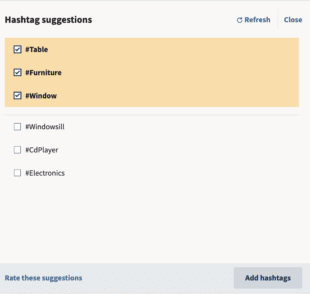
Whenever you’re creating a post in Composer, Hootsuite’s AI technology will recommend a custom set of hashtags based on your draft. The tool analyzes both your caption and the images you’ve uploaded to suggest the most relevant tags.
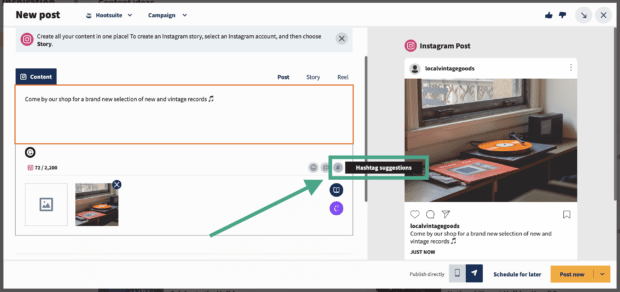
All you have to do is click on the suggestions you like to add them to your post. You can then publish it or schedule it for later.
8. Tag the accounts you feature in your posts
If your post features another brand, creator, or customer, tag them.
Not only is it good posting etiquette, but it can also expand your reach. Tagged accounts often reshare posts with their own followers, giving your content visibility beyond your own followers.
And remember: if your content marketing strategy involves user-generated content (UGC), always make sure you tag the original creator. That’s a golden rule on social.
Conversion optimization
9. Include a CTA and link in your bio
If your goal is to drive conversions, add a clear call to action (CTA) to your profile bio. Encourage visitors to click through to your website, online store, or a specific landing page.
Feel free to swap out the link in your bio regularly to highlight your latest campaign, product launch, or piece of content.
See Hootsuite’s link in bio as an example.

Pro tip 💡: Use a tool such as One Click Bio to create a link tree and sneak more than one link into your bio. With a bio link tree, you can easily promote your most-recent content, link to your other social accounts, direct traffic to an online store or landing page, and keep your profile visitors engaged with your business.
10. Optimize your links with UTMs
Most social posts include a link that sends people somewhere else, like your website, a blog post, or a landing page. If you want to know what’s actually driving traffic, those links need to be trackable.
That’s where UTMs come in. Adding UTM parameters to your links lets you see exactly which posts and platforms are bringing people to your site.
Once you have that data, it’s much easier to see what’s working and adjust your strategy.Want a walkthrough? Check out our guide to using UTMs on social media.

Accessibility optimization
11. Make sure your images are the right size
Using properly sized images is key on social media.
Nothing makes a social profile look sloppy faster than blurry, low-resolution images. At best, it makes your brand look unprofessional. At worst, it makes it look spammy and fake.
Use a high-resolution profile picture that clearly represents your brand (usually your logo), and keep it consistent across all your social channels. That consistency helps with brand recognition.
If you’re planning on crossposting the same image to multiple networks, double-check our always-up-to-date cheat sheet for image sizes across networks.

Psst: Using a social media management tool like Hootsuite can make it much easier to crosspost without making mistakes.
Hootsuite allows you to:
- Compose your post in the publisher
- Edit the text and images for different platforms
- Preview how they’ll look before posting


12. Add alt text descriptions to visual content
Adding alt text and other accessibility features is an important social media optimization technique.
This is because not everyone experiences social media content the same way, which is why accessibility should be part of your optimization strategy.
Accessible visual content on social media includes:
- Alt text descriptions. Alt text allows visually impaired users to understand images by providing a written description of what’s shown. Platforms like Facebook, X (Twitter), LinkedIn, and Instagram now include fields where you can add alt text to images. Here are some tips for writing descriptive alt text.
- Subtitles. All social videos should include captions. Not only are they crucial for hearing-impaired viewers, but they also help in sound-off environments. Language learners also benefit from subtitles. Plus, people who watch videos with captions are more likely to remember what they saw.
- Descriptive transcripts. Unlike captions, these transcripts describe the important sights and sounds that aren’t spoken or obvious.

Overall performance optimization
Take the time to look at your current social media performance and think about the following areas:
- Are you hitting your goals and objectives?
- Do your social media goals still align with your larger digital marketing strategy?
- Are you posting the right types of content? For example, images, videos, text-only, or a mixture of all three? (Hint: you want to aim for all three!)
- Are your posts resonating with your target audience?
Evaluating the areas above will help you understand how your social media optimization tactics are affecting overall performance.
Most social networks provide built-in analytics dashboards where you can track metrics like reach, engagement, and follower growth. But if you want to compare performance across multiple networks, that brings us to our thirteenth tip:
13. Use a social media analytics dashboard
A social media analytics dashboard like Hootsuite can help you monitor and improve performance across all of your social media channels.

A tool like this makes it easy to see where you should focus your social media optimization efforts next.
You can even use the benchmarking tool in Hootsuite Analytics to compare the performance of your social accounts against the average of brands in your industry with just a couple of clicks.
You’ll even find resources to improve your performance right in the summary section:
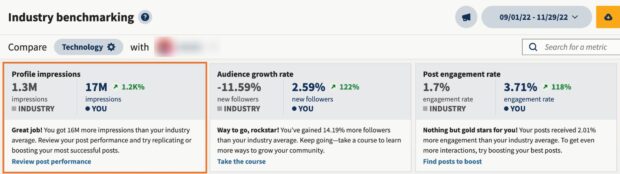
After, you can track the impact your efforts made in the same easy-to-use dashboard.
Looking for a social media optimization tool that can help you improve your engagement, follower growth, conversion rate, accessibility, and overall performance? Hootsuite can help you do all of these things with the following features:
- Best times to post recommendations
- AI hashtag generator
- Scheduling for all different types of social media posts, including carousels and stories
- Social media post templates to help you create high-quality content
- Image editor with dimensions per network
- Crossposting editing capabilities
- Monthly view content calendar
- Alt text for social media images
- Closed captioning for X (Twitter) and Facebook videos
- Real-time performance tracking for all major networks to see if your social media optimization efforts are working
FAQ: Social media optimization
What is social media optimization and how does it improve marketing results?
Social media optimization is the practice of improving your profiles, posts, and content so more people can find and engage with them. Done well, it helps brands increase reach, drive traffic, and turn social activity into measurable business results.
What are the most effective social media optimization strategies for businesses?
The most effective social media optimization strategies for businesses include posting during high engagement windows, using strong visuals, writing clear captions and CTAs, and adding relevant hashtags and tags. Tracking performance and adjusting based on what works is just as important.
How do brands optimize social media profiles, posts, and content for discovery?
Brands optimize social media profiles and content for discovery by using relevant keywords, hashtags, and descriptive captions that match how people search. Leaning into strong visuals and engaging formats like short-form video or carousels also help content surface in feeds and search.
What tools help enterprises manage social media optimization at scale?
Enterprises often use social media management platforms like Hootsuite to manage social media optimization at scale. With Hootsuite, teams can plan, publish, and analyze content across multiple networks. This helps them stay organized, track performance, and optimize posts more efficiently.
How do companies measure the impact of social media optimization?
Companies measure the impact of social media optimization by tracking changes in reach, engagement, traffic, and conversions over time. If optimized posts consistently bring in more visibility, clicks, or sales, the strategy is working.
Save time managing your social media marketing using Hootsuite. Schedule and publish content, engage your audience, and measure the performance of all your accounts, across networks — all from a single dashboard. Try it free today.